Guest Analytics Explained: Foot Traffic, Dwell Time, and Zone Behavior from Existing Cameras
Guest analytics is the practice of using artificial intelligence (AI)-powered video analysis to measure how guests move through and interact with a physical space.
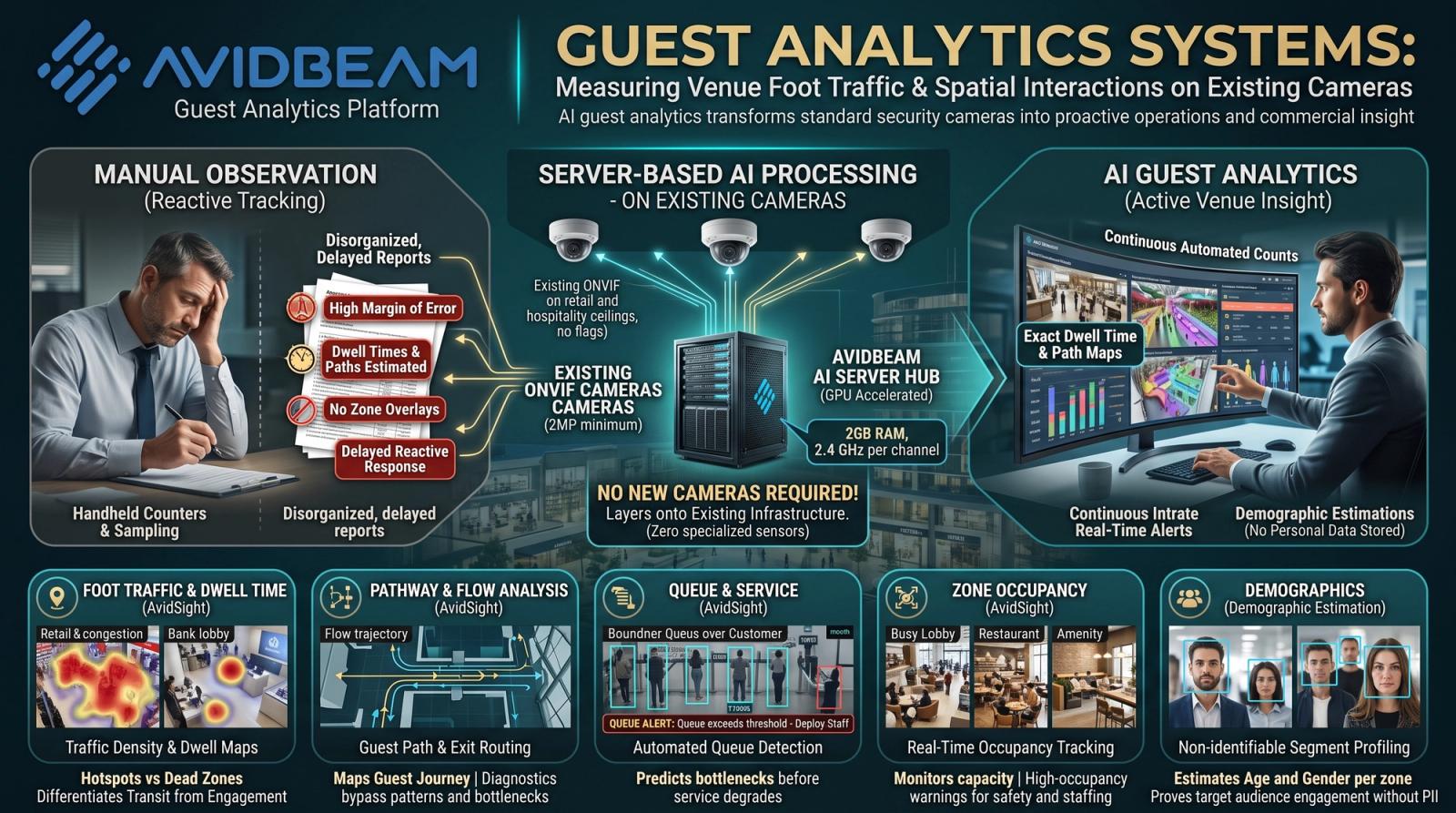
| What is guest analytics?Guest analytics is the practice of using artificial intelligence (AI)-powered video analysis to measure how guests move through and interact with a physical space. It captures foot traffic volume, dwell time per zone, movement paths from entry to exit, zone occupancy levels, queue formation, and demographic distribution, all from existing camera infrastructure without interrupting the guest experience. The data is processed continuously in real time and delivered as structured metrics that venue operators, retail managers, and hospitality teams use to make decisions about space layout, staffing, service design, and marketing. |
Most venues already have cameras. They were installed for security. But the footage from those cameras contains a complete record of guest behavior that goes unread: which zones draw guests in, which areas they pass through without stopping, where queues form before staff notice, and when peak periods actually occur versus when managers assume they do.
Guest analytics reads that footage continuously, extracts behavioral data from every frame, and turns it into the metrics that operations and commercial teams need to run a more responsive facility. The decisions that previously required manual observation, staff surveys, or post-hoc reporting can be made from live and historical data instead.
This article covers what guest analytics measures, how the AI processes camera data, where it is deployed, and how the metrics translate into operational and commercial decisions.
What Does Guest Analytics Measure?
Guest analytics platforms measure six categories of behavioral data from camera feeds across a facility. Each category addresses a different operational or commercial question.
Foot traffic counts how many guests enter and move through each zone per hour and per day. Dwell time measures how long guests spend in each zone before moving on. Path analysis maps the routes guests take from entry through the facility to exit or to a conversion point such as a product display or service counter. Zone occupancy tracks how many guests are present in a defined area at any given moment. Queue detection identifies when and where queues form and how long they remain above a configured threshold. Demographic estimation assigns age group and gender classifications to guest segments per zone without recording or storing personal identity information.
The comparison below maps what manual observation delivers against what an AI guest analytics system measures across the same categories.
| Metric | Manual Observation | AI Guest Analytics |
|---|---|---|
| Foot traffic counting | Manual tally counters at entry points; sampled and extrapolated | Continuous automated counts across every entry, exit, and internal zone simultaneously |
| Dwell time measurement | Estimated from staff observation; not recorded per zone | Exact dwell time per zone per guest segment, timestamped and logged continuously |
| Path and flow tracking | Not measurable without dedicated observation staff | Full path tracking from entry to exit across every camera zone in sequence |
| Zone occupancy | Periodic visual checks by staff; not time-stamped | Real-time occupancy per zone with historical trend data and peak period identification |
| Demographic segmentation | Manual observation with high margin of error; sampling only | AI-based age group and gender estimation per zone without storing personal identity data |
| Queue detection | Staff notified after queue forms; reactive response | Automated queue length alerts when thresholds are exceeded; proactive staff deployment |
| Repeat visitor identification | Not possible without manual recognition or loyalty card scanning | Camera-based recognition identifies returning guests for VIP and loyalty service triggers |
| Data output | Summary counts; no spatial or behavioral granularity | Zone-level heatmaps, traffic flows, dwell distributions, occupancy curves, and conversion ratios |
How Does Guest Analytics Work?
Guest analytics processes live video from the camera network through an AI platform that applies trained detection and tracking models to each frame. The output is structured behavioral data, not raw footage.
Camera-Based Data Collection
Guest analytics runs on the camera infrastructure organizations already have. Any Open Network Video Interface Forum (ONVIF)-compliant IP camera at minimum 2 Megapixel resolution connects to the platform. There is no requirement for specialized people-counting sensors, thermal cameras, or floor-mounted detection hardware. The AI model running on the server extracts behavioral data from the video signal that the cameras were already capturing.
Camera placement determines which behaviors the system can measure. Overhead mounting captures accurate people counts and zone occupancy. Angled or entrance-level cameras enable path tracking and queue detection. A deployment scoping assessment identifies the placement adjustments needed to capture the metrics the organization requires from its existing camera network.
Server-Based AI Processing
The accuracy of guest analytics depends on where the artificial intelligence runs. Edge-based processing, where detection happens inside the camera device itself, is constrained by the hardware limits of a camera chip. This degrades accuracy in crowded scenes, under variable lighting, and across wide-angle fields of view.
Server-based guest analytics runs full-depth AI models centrally. The minimum server specification is 2 GB of Random Access Memory (RAM) and a 2.4 GHz processor per camera channel, allocated at the server level. This architecture supports accurate detection across high-density scenes, multiple overlapping zones, and complex path tracking because the model has the compute to handle these conditions.
AvidBeam's AvidSight platform delivers guest analytics from this server-based architecture. It measures foot traffic, dwell time, zone occupancy, path flows, queue depth, and demographic distribution from existing cameras, with outputs delivered to a unified operations dashboard and configurable alert thresholds for real-time response.
| Running an existing camera network at your venue or retail space? AvidBeam's guest analytics platform connects without hardware replacement. Contact info@avidbeam.com for a deployment assessment. |
Where Is Guest Analytics Used?
Guest analytics is used in any physical environment where understanding how guests move and behave translates into operational or commercial value. The table below maps the most common deployment environments to their specific applications.
| Environment | Facility Type | Guest Analytics Applications |
|---|---|---|
| Retail stores | Fashion, electronics, hypermarkets, and specialty retail | Zone traffic counts, dwell time by product area, conversion rate from entrance to purchase zone, queue alerts at checkout |
| Shopping malls | Multi-level retail destinations with common areas and food courts | Mall-wide footfall by hour and day, tenant zone performance comparison, peak period staffing triggers, food court occupancy |
| Hotels and resorts | Lobbies, restaurants, spa facilities, and recreational areas | Guest flow from check-in to amenity zones, dining area occupancy, peak service demand by hour, VIP guest recognition at entry |
| Airports and transit hubs | Departure halls, retail concourses, lounges, and gate areas | Passenger density per zone, queue length at security and boarding, retail dwell time, lounge occupancy management |
| Museums and cultural venues | Exhibition halls, galleries, ticketing areas, and gift shops | Exhibit engagement by zone, crowd density alerts in high-interest areas, visitor path analysis, peak entry period management |
| Sports and entertainment venues | Concourses, concession stands, seating areas, and entry gates | Pre-event ingress flow monitoring, concession queue management, zone occupancy for safety compliance, post-event egress analysis |
| Healthcare facilities | Hospital lobbies, waiting areas, outpatient departments, and pharmacies | Patient wait time estimation, zone occupancy for capacity planning, high-density alerts in waiting areas, staff allocation guidance |
| Corporate campuses | Reception areas, cafeterias, meeting hubs, and co-working zones | Space utilization by zone and time, peak cafeteria demand, meeting area occupancy, visitor flow from reception to destination |
How Does Guest Analytics Data Translate into Decisions?
Guest analytics data is only useful if it connects to decisions. The metrics each address a specific operational or commercial question that venue managers, retail operators, and hospitality teams face.
Space and Layout Decisions
Zone traffic counts and dwell time data show which areas of a facility attract guests and which they move through without engaging. A retail zone with high traffic but low dwell time indicates a layout or merchandising problem. A hospitality area with high dwell time but low repeat visits indicates a service quality or discovery gap. As covered in AvidBeam's article on heatmap analysis, the visual representation of guest density across a floor plan makes these patterns immediately legible to the teams responsible for acting on them.
Staffing and Service Decisions
Queue length alerts and peak occupancy data connect guest behavior to staffing requirements in real time. When queue detection identifies a checkout line exceeding the configured threshold, the alert reaches the floor manager in time to open an additional counter. When zone occupancy reaches capacity for a dining area, the front-of-house team receives a notification before guests begin to queue at the entrance. These are proactive responses based on live data, not reactive responses to complaints.
Marketing and Conversion Decisions
Path analysis and zone conversion data show whether promotional placements, window displays, and in-store navigation are working as intended. If the path from the entrance to a featured product zone is one that most guests do not take, the merchandising team has evidence for a layout change. If a promotional zone generates high dwell time but low movement to the purchase area, the conversion gap is measurable and actionable. For a broader view of how video-based behavioral data supports commercial decisions, see AvidBeam's article on video analytics.
FAQ
What is guest analytics?
The use of AI-powered video analysis to measure guest foot traffic, dwell time, movement paths, zone occupancy, queue formation, and demographic distribution from existing cameras in real time.
Does guest analytics require new cameras?
No. Any ONVIF-compliant IP camera at minimum 2 Megapixel resolution connects to AvidBeam's server-based guest analytics platform without hardware replacement.
Does guest analytics store personal data about guests?
No. AvidBeam's platform measures behavioral patterns and demographic segment distributions without storing personal identity data or individual guest profiles.
What is the difference between guest analytics and people counting?
People counting measures how many individuals pass a point. Guest analytics measures what those individuals do once inside: where they go, how long they stay, what routes they take, and how their behavior varies by zone, time, and segment.
Can guest analytics detect queues in real time?
Yes. AvidBeam's platform monitors queue length per zone and sends configurable alerts when thresholds are exceeded, enabling proactive staff deployment before queues become a service problem.
How does guest analytics handle crowded scenes?
Server-based processing runs full-depth AI models centrally, maintaining accurate people detection and tracking across high-density scenes that degrade edge-based camera systems.
What outputs does a guest analytics platform provide?
Zone-level foot traffic counts, dwell time distributions, path flow maps, occupancy curves, queue depth alerts, demographic segment breakdowns, and peak period reports, all delivered through a unified operations dashboard.
| Want to see guest analytics running on your existing camera infrastructure?Request a live demo of AvidBeam's guest analytics platform at your venue, retail space, or hospitality facility. Send an email to info@avidbeam.com to schedule a session with the technical team. |
 Article
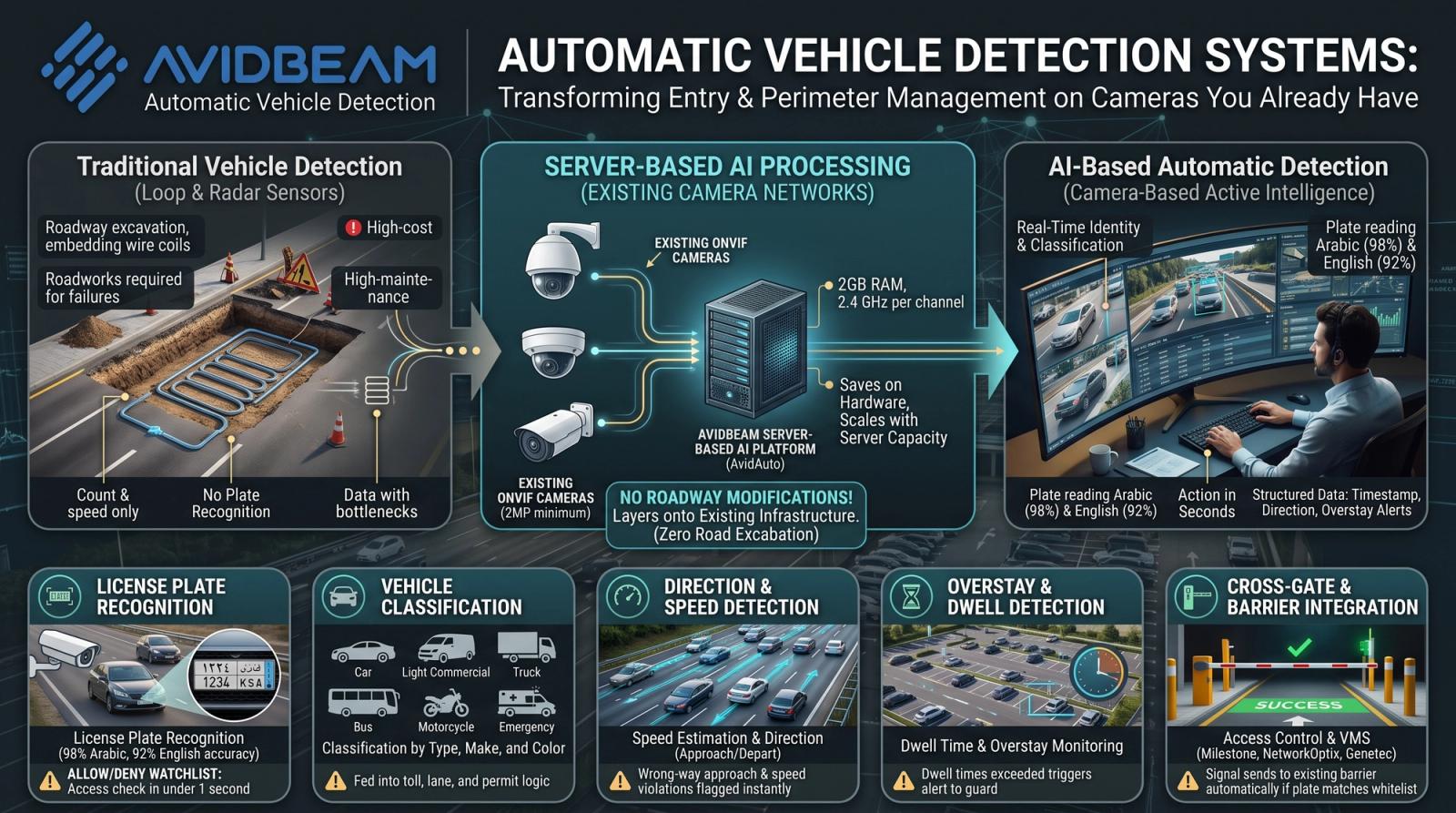
How an Automatic Vehicle Detection System Identifies, Classifies, and Logs Every Vehicle in Real Time
An automatic vehicle detection system is a camera-based platform that uses artificial intelligence (AI) to detect, classify, and identify vehicles as they enter a monitored area, without requiring inductive loops, radar sensors, or any physical roadway infrastructure.
 Article
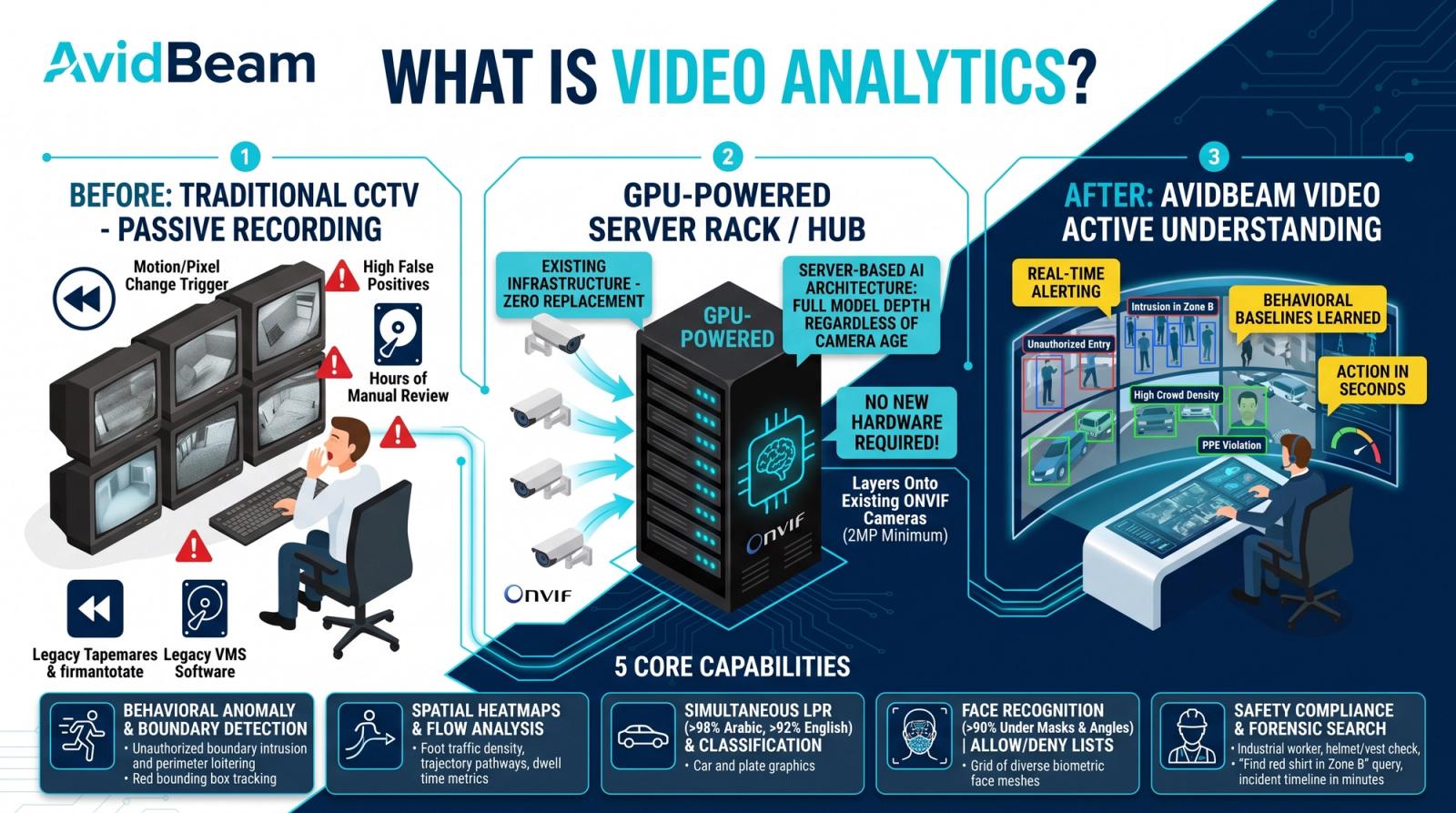
Video Analytics: Turn Camera Feeds Into Operational Intelligence
Your camera infrastructure already captures everything that happens across your facilities. The question is whether anything is actually done with that footage, or whether it sits on a server, reviewed only after something goes wrong.
 Article
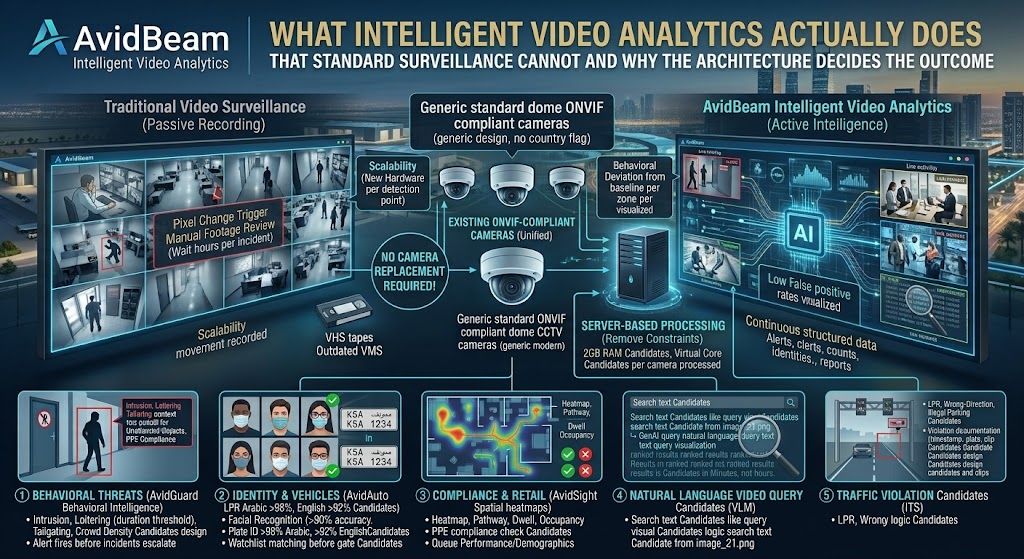
What Intelligent Video Analytics Actually Does That Standard Surveillance Cannot and Why the Architecture Decides the Outcome
Intelligent video analytics is the application of Artificial Intelligence (AI), deep learning, and computer vision to camera feeds to automatically detect security threats, identify individuals, verify compliance, and generate operational intelligence without human review of footage
Experience AI Video Analytics
on your existing cameras.
Start with a pilot deployment and scale seamlessly as your operational requirements evolve.