Video Analytics: Turn Camera Feeds Into Operational Intelligence
Your camera infrastructure already captures everything that happens across your facilities. The question is whether anything is actually done with that footage, or whether it sits on a server, reviewed only after something goes wrong.
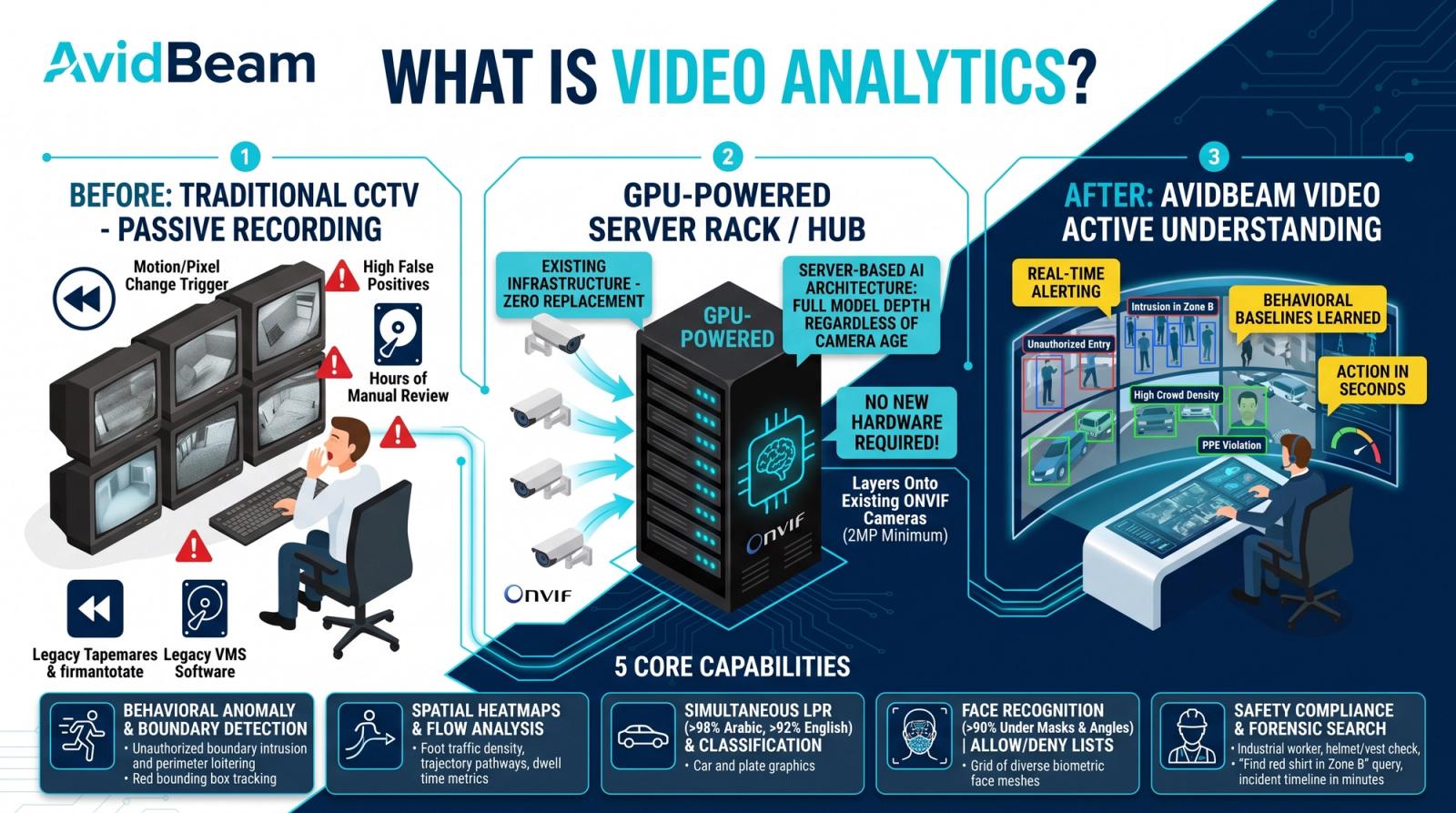
| What is video analytics?Video analytics is software that automatically processes camera footage to extract actionable information — detecting objects, counting people, reading license plates, identifying behavior patterns, and triggering alerts in real time. Unlike basic recording systems, video analytics interprets what cameras see and delivers intelligence that operations and security teams can act on immediately, without waiting for manual footage review. |
Your camera infrastructure already captures everything that happens across your facilities. The question is whether anything is actually done with that footage, or whether it sits on a server, reviewed only after something goes wrong.
Video analytics changes that equation. It turns passive surveillance into active intelligence. Instead of recording events for later review, it detects, classifies, and responds to them as they happen.
This article covers what video analytics does, how it works, where it is deployed, and what your infrastructure needs to support it.
What Is the Difference Between Video Analytics and Traditional CCTV?
Most organizations already have cameras. The gap between what those cameras capture and what the organization actually knows about its environment is where video analytics operates.
Traditional closed-circuit television (CCTV) records footage. It does not interpret it. An operator watching a bank of monitors can only process a fraction of what the cameras are capturing. Everything else is stored, not seen.
Video analytics processes every camera feed automatically. It applies detection models to each frame, classifies what it finds, and generates structured outputs, alerts, counts, identity matches, reports, without waiting for a human to review the footage.
| Dimension | Traditional CCTV | Video Analytics |
|---|---|---|
| Purpose | Record footage for later review | Detect, classify, and alert in real time |
| Response time | Minutes to hours after the event | Seconds from detection to alert |
| Operator requirement | Continuous manual monitoring | Automated detection with operator confirmation |
| Data output | Video files only | Counts, alerts, reports, and structured data |
| False positive rate | High — weather, animals, and lighting changes trigger alerts | Low — deviations from per-zone baselines only |
| Identity awareness | None — records anonymous movement | Named individual tracking via facial recognition |
| Scalability | Limited by number of operators | Scales with server capacity, not headcount |
| Learning capability | Fixed — does not improve over time | Improves through zone-specific baseline learning |
What Can Video Analytics Do?
The capabilities of video analytics span detection, classification, counting, and behavioral analysis. Different deployments use different capability sets depending on the environment and the objective.
Motion and Intrusion Detection
Motion detection identifies movement within a defined zone and determines whether that movement comes from a relevant object — a person, a vehicle, or both. Intrusion detection extends this by triggering alerts when objects cross designated boundaries, enter restricted areas, or remain in monitored zones beyond a permitted duration.
Unlike basic motion sensors, video analytics distinguishes between a person and an animal or a flag moving in the wind. This classification step reduces false alerts significantly.
People Counting and Flow Analysis
Video analytics systems count individuals entering, exiting, or passing through defined zones. This data feeds occupancy monitoring, queue management, and crowd density tracking. In retail, banking, and event venues, people counting informs staffing levels and layout decisions.
Flow analysis tracks movement patterns over time, identifying bottlenecks, preferred pathways, and high-dwell zones. At Soundstorm in Riyadh, video analytics monitored crowd flow across a venue of more than 450,000 attendees over three days.
Vehicle Detection and License Plate Recognition
Vehicle analytics covers detection, classification by type, speed estimation, and license plate recognition (LPR). LPR systems read plates in Arabic and Latin scripts and cross-reference them against allow or deny lists in real time.
AvidBeam's AB - ITS and AB - Smart Parking modules achieve 98% accuracy on Arabic plates and 92% on English plates. A deployment in Riyadh covered 18,000 parking spaces across multiple facilities using this capability. The AvidSight platform consolidates vehicle data alongside other analytics streams for unified operational visibility.
Behavioral and Anomaly Detection
Advanced video analytics systems establish baseline behavior patterns for each monitored zone and flag deviations. Anomalies flagged include loitering, running in restricted areas, crowd formation, abandoned objects, and tailgating at access points.
These capabilities operate continuously without fatigue. A security operator reviewing dozens of camera feeds manually will miss events. An analytics engine running server-based processing does not.
| Need to monitor multiple environments from a single platform? AvidBeam integrates video analytics with your existing VMS and access control infrastructure. |
How Does Video Analytics Work?
Video analytics processes camera feeds through a pipeline: ingest the video stream, run object detection and classification models, apply zone-specific logic, and generate outputs — alerts, counts, reports, or API events.
The Server-Based Processing Advantage
Video analytics can run at the camera level, at the edge, or on a central server. The architecture choice determines accuracy, scalability, and the range of detection capabilities available.
Camera-embedded and edge-based systems are constrained by the processing capacity of each unit. Detection models run at reduced depth. Accuracy degrades under masks, variable lighting, non-frontal angles, and high-speed movement.
Server-based video analytics processes all camera feeds through dedicated server infrastructure. Detection models run at full depth regardless of camera age or specification. The minimum hardware requirement is 2 GB of Random Access Memory (RAM) and a 2.4 GHz processor per camera channel. The system integrates with Open Network Video Interface Forum (ONVIF)-compliant cameras and connects to Video Management Systems (VMS) including Milestone, NetworkOptix, and Genetec. Deployment options include on-premise, private cloud, public cloud, and hybrid environments.
Per-Zone Baseline Learning
Each monitored zone develops its own behavioral baseline over time. The system learns what is normal for that specific area, foot traffic patterns, vehicle flow, occupancy levels, and alerts only on genuine deviations.
This zone-specific learning reduces false positives significantly. A crowd forming outside a stadium entrance during event hours is normal. The same crowd forming at 3:00 AM is an anomaly that warrants immediate attention.
Where Is Video Analytics Used?
Video analytics serves a wide range of industries and environments. The core capability set detection, classification, counting, behavioral analysis, remains consistent while the specific use cases differ by sector.
| Environment | Primary Use Cases | Key Outputs |
|---|---|---|
| Critical infrastructure | Perimeter intrusion, access control, threat detection | Real-time alerts, access logs, incident reports |
| Retail and banking | People counting, queue monitoring, heatmaps, loss prevention | Occupancy data, dwell time, conversion analytics |
| Hospitality | Lobby occupancy, pool safety, service area monitoring | Guest flow data, staff deployment signals, safety alerts |
| Transportation and parking | License plate recognition (LPR), vehicle counting, traffic flow | Plate reads, occupancy rates, traffic reports |
| Events and venues | Crowd density, access control, emergency response zones | Crowd counts, flow data, evacuation routing |
| Healthcare | Patient fall detection, restricted zone monitoring | Safety alerts, compliance logs, movement data |
| Education | Campus access control, occupancy, behavioral monitoring | Entry logs, attendance data, anomaly alerts |
| Industrial | Personal protective equipment (PPE) compliance, fire and smoke detection | Compliance rates, violation alerts, safety reports |
What Does Video Analytics Require to Deploy?
Deploying video analytics successfully depends on three things: adequate camera coverage, sufficient server infrastructure, and clear definitions of what you want to detect and where.
Camera positioning matters as much as camera count. A single well-positioned camera covering a chokepoint delivers more analytics value than three cameras with overlapping blind spots. Resolution requirements depend on the use case — LPR requires higher resolution than simple motion detection.
On the infrastructure side, server-based processing handles most of the compute load. Existing IP cameras that are ONVIF compliant typically integrate without hardware changes. The analytics platform sits between the cameras and the VMS, enriching the video stream with structured data before it reaches operators. Read more about how intelligent video analytics extends standard surveillance capabilities with AI-driven detection and behavioral analysis.
FAQ
What is the difference between video analytics and video surveillance?
Video surveillance records footage; video analytics interprets footage in real time and generates actionable data without requiring a human to watch the cameras.
Does video analytics require special cameras?
No. Most ONVIF-compliant IP cameras work with server-based video analytics platforms without hardware upgrades or camera replacement.
Can video analytics work with an existing VMS?
Yes. AvidBeam integrates with Milestone, NetworkOptix, and Genetec, adding analytics intelligence to existing infrastructure.
How accurate is video analytics for license plate recognition?
AvidBeam's AB - ITS (Intelligent Traffic Systems) module achieves 98%+ accuracy on Arabic plates and 92%+ on English plates from road and parking cameras.
Is video analytics only for large enterprises?
No. Server-based architectures scale from a few cameras to tens of thousands. Read how AI video analytics is applied at different scales across sectors.
What deployment options are available?
On-premise, private cloud, public cloud, and hybrid — depending on data governance requirements and latency targets.
How does video analytics handle false alerts?
Per-zone baseline learning distinguishes genuine anomalies from routine movement, reducing false positives without requiring manual threshold configuration for every camera.
| Want to see video analytics in action?Request a live demo of AvidBeam's platform on your existing cameras. Send an email to info@avidbeam.com to schedule a session with the technical team. |
 Article
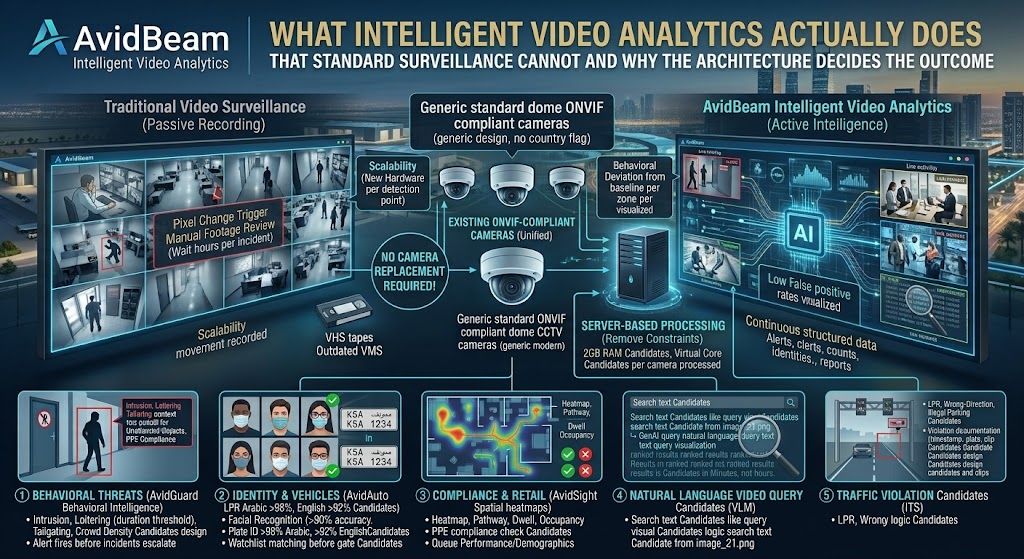
What Intelligent Video Analytics Actually Does That Standard Surveillance Cannot and Why the Architecture Decides the Outcome
Intelligent video analytics is the application of Artificial Intelligence (AI), deep learning, and computer vision to camera feeds to automatically detect security threats, identify individuals, verify compliance, and generate operational intelligence without human review of footage
 Article
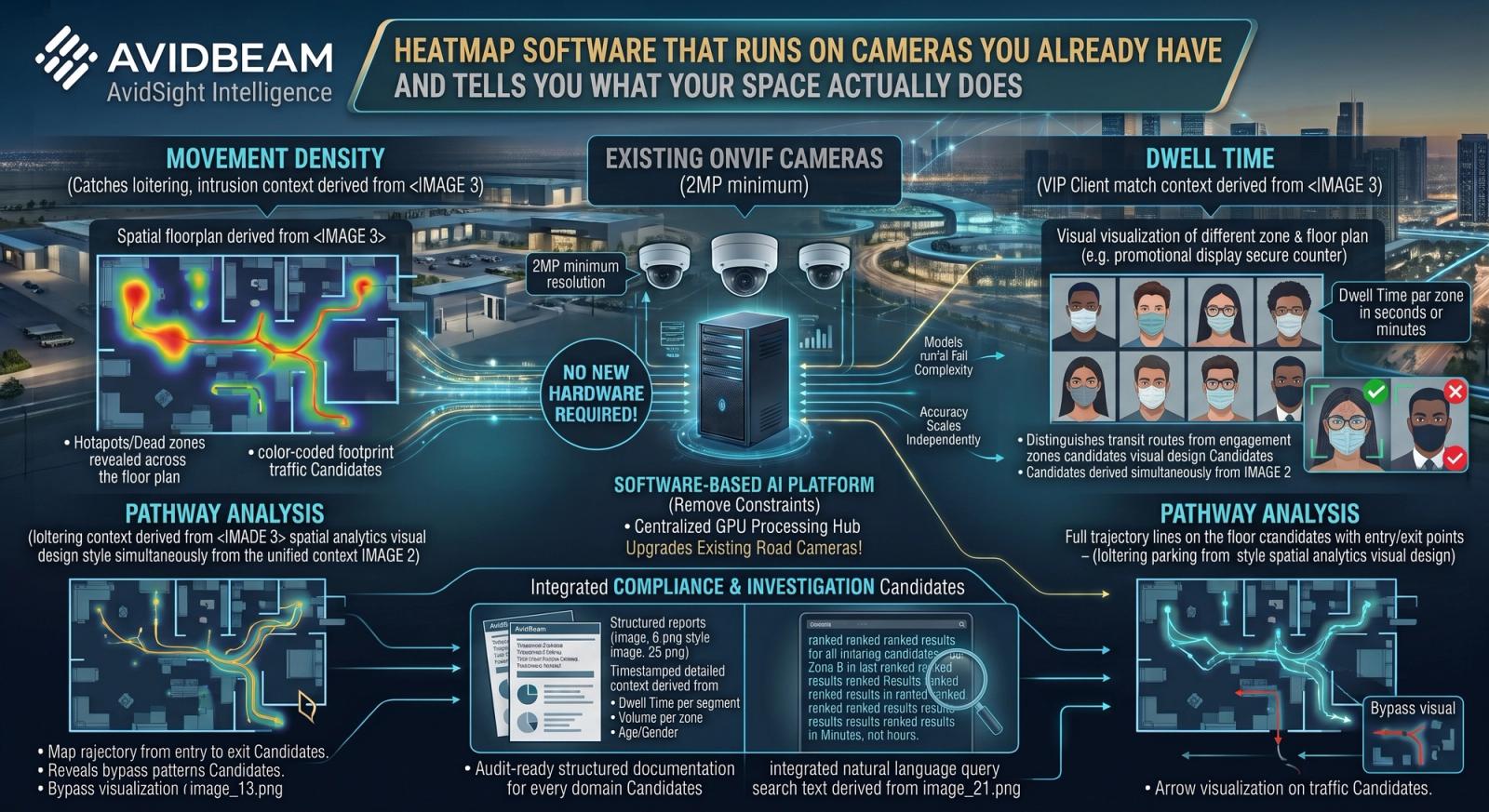
Heatmap Software That Runs on Cameras You Already Have and Tells You What Your Space Actually Does
If you are evaluating heatmap software, you probably already know that something about your space is not working the way you expected. Customers are not finding a product zone. A service counter has inconsistent wait times
 Article
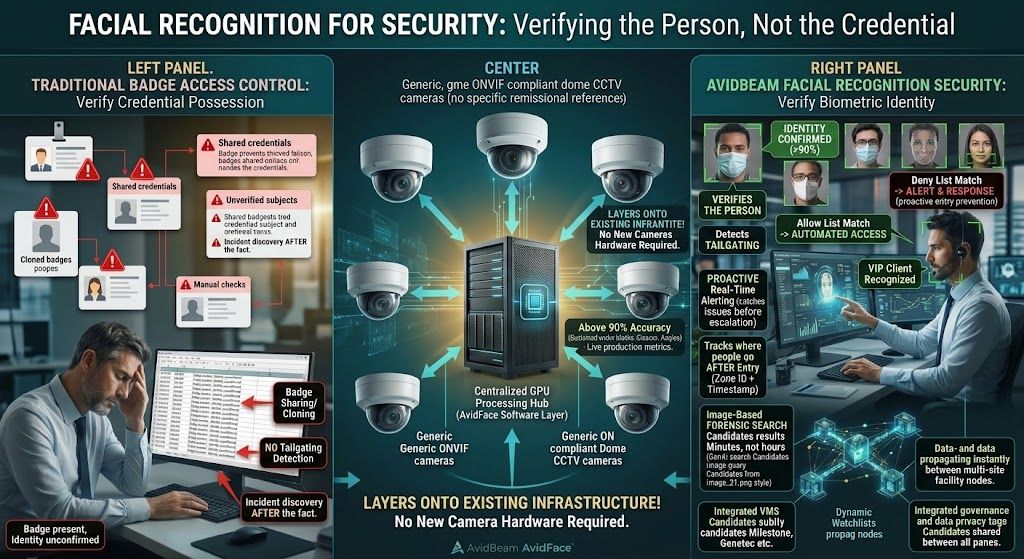
Facial Recognition for Security: What It Catches That Badge Systems Cannot and How It Works on Existing Cameras
Badge-based access control has one fundamental limitation: it verifies that a credential is present, not that the person presenting it is who it says they are. A badge can be cloned, shared, lost, or used by someone it was not issued to
Experience AI Video Analytics
on your existing cameras.
Start with a pilot deployment and scale seamlessly as your operational requirements evolve.